
This update is optional and with no deadline. Version 2.3.0 keeps working exactly as it does today, so update only if and when it suits your team.
This article takes you through how to complete the update, what to expect, and how to re-add your projects to the integration after the update.
Before you start
- You need full Procore admin permissions (Admin on the Company Directory).
- Important: Updating resets the integration's project level permissions in Procore. So your projects will be disconnected from the integration. Follow this guide all the way through as steps 3 and 4 show how to re-connect your projects.
- Consider when you choose to complete the update (ideally after site hours, over the weekend, when there will be minimal activity on your projects).
What's changing
AI agents in Procore can access Breadcrumb data
Version 2.9.0 adds support for AI agents in Procore. Once updated, agents your team uses in Procore can work with your Breadcrumb data alongside your Procore data.
No permission changes
Breadcrumb keeps the same Procore permissions as version 2.3.0. You don't need to create or change the permission template.
| Company level | Project level | |
|---|---|---|
| Admin | Admin | None |
| Daily Log | None | Admin |
| Directory | Admin | Admin |
| Documents | Admin | Admin |
| Timecard | Admin | None |
Everything else works the same
- Procore projects sync to Breadcrumb sites, and companies sync to suppliers.
- Project Team members sync to Site Hosts, including removing hosts taken off a Project Team.
- Hours sync to Daily Logs, including re-opening closed Daily Logs.
- Two-Way Sync keeps working, with no extra setup.
Step 1: Open App Management
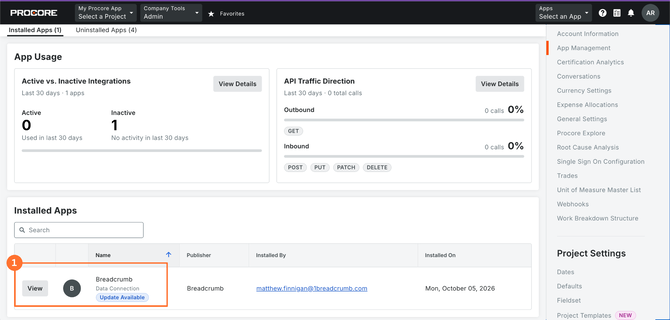
- As a full Procore admin, click Apps > Select an App in the top right, then choose App Management.
- Find Breadcrumb under Installed Apps. It will show Update Available.
- Click View.
Step 2: Update the Breadcrumb app
- On the Breadcrumb app page, click Update App in the top right.
- Procore shows the update for version 2.9.0. There are no permission changes to review.
- Click Update.
The app is now on version 2.9.0, but it can't see any projects yet.
Next you re-add the projects. Complete steps 3 and 4 or nothing will sync between Breadcrumb and Procore.
Step 3: Find the Breadcrumb integration user
Breadcrumb connects to Procore through its own integration user in your Company Directory. You'll add your projects back from here.
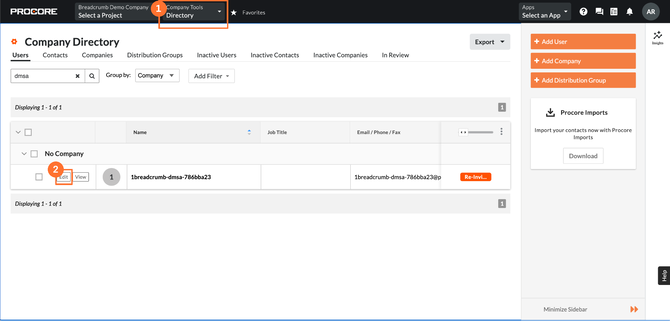
- Click Company Tools > Directory.
- Search for dmsa. You'll find one user starting with 1breadcrumb-dmsa-.
- Click Edit next to it.
Step 4: Add your projects back
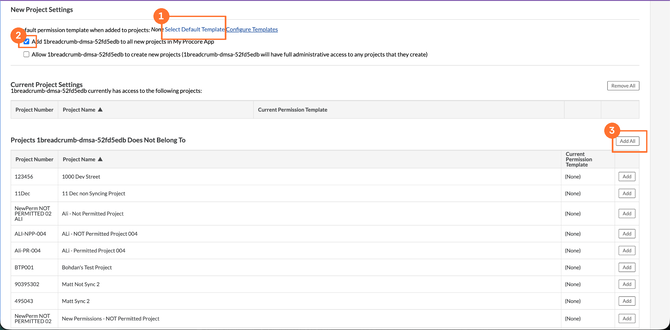
Scroll to the bottom of the integration user's page to New Project Settings. You'll use the permission template you already have, so there's no need to create a new one.
- Check the default permission template shows the template you already use. If it shows None, click Select Default Template and choose it.
- Make sure Add 1breadcrumb-dmsa-... to all new projects in My Procore App is ticked, so new projects are picked up automatically.
- Click Add All. The integration is added back to every existing project.
Don't skip this step. If projects aren't added back, the Breadcrumb and Procore integration remains disconnected and nothing will sync.
Alternative: add projects from the app
If you don't use a permission template and choose projects yourself, add them back from the app instead of following steps 3 and 4.
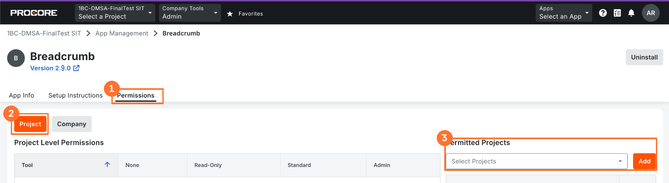
- Go to Apps > Select an App > App Management and click View on Breadcrumb.
- Click the Permissions tab.
- Click Project.
- Under Permitted Projects, select your projects and click Add. Repeat until all your projects are back in the list.
Common questions
Do we have to update?
No. Updating is optional and there's no deadline. Version 2.3.0 keeps working exactly as it does today.
Will our permissions change?
No. Version 2.9.0 uses the same Procore permissions as 2.3.0, so your existing permission template still works and there's nothing new for your IT or security team to approve.
Do we need a new permission template?
No. Reuse your existing template and click Add All.
Will we lose any data or settings?
No. Only projects need to be re-added. Sites, suppliers, Site Hosts and Daily Log hours sync the same way after the update.
We use Two-Way Sync. Is there anything extra to do?
No. Creating companies in Procore from Breadcrumb keeps working after the update.
Sync stopped after updating
The most likely cause is that projects weren't added back. Follow steps 3 and 4, or the alternative above. Check the integration user has been added to all projects, or that your projects are listed under Permitted Projects in the app.
Need help or have questions?
Contact your Customer Success Manager or our Support Team on 1300 744 666 or email support@breadcrumb.co.
We're happy to help!