
NextGen is more than a makeover. We've re-built Breadcrumb's web portal from the ground up, and added some new features and functionality to your toolkit.
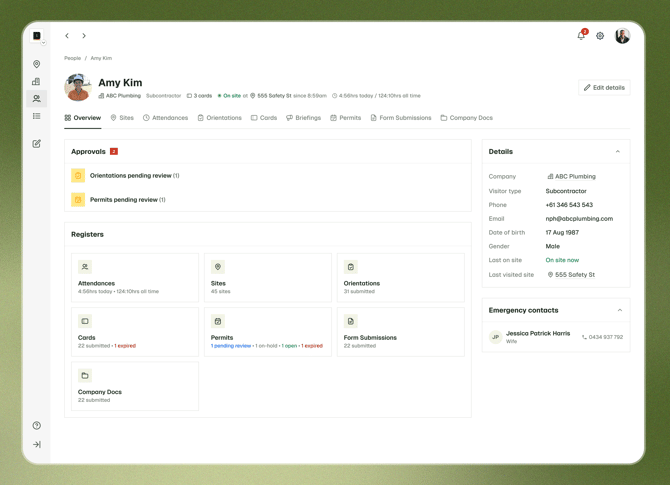
From October 19th, users can switch between the Classic and Nextgen web portals using a toggle in both portals. Allowing users to learn the new portal in their own time, and easily navigate back to Classic to complete tasks that are yet to migrate across.
You can always refer back to this page anytime for updates as we complete the re-build.
Jump to:
Who can use NextGen?
NextGen will be readily available for everyone on October 19, but in its current state, it's mainly ready for day-to-day site management teams.
- Site managers who manage day-to-day safety operations
- Site hosts who need to access records across one or more sites
Company admins can use NextGen too, but will still need Classic for setup work like permissions, forms, integrations and settings. Keep reading for a more in-depth overview.
Are there any new features in NextGen?
Yes! We are bringing across our most used features to NextGen, with improvements where possible. All new features will be coming to NextGen, and our mobile app alone.
New features include:
- Site-based workspaces. Each site has its own home, with registers filtered to that site, so you no longer start with a company-wide list and filter down.
- Site overviews. One screen that shows who's on site, which companies are compliant, any outstanding documents, and the date of the last evacuation drill.
- Colour-coded compliance indicators. Each subcontractor document type shows its status at a glance: submitted, under review, rejected or expired.
- Company Compliance. See which companies have finished onboarding and which are working on your site right now.
- Worker profiles. View a worker's details in one record. You can now also download their badge (QR code) and edit their name, company, visitor type and more on that site.
- Evacuation records. Each record shows the muster list grouped by company, with anyone unaccounted for highlighted. The Sites register flags any site with an active evacuation, and you can export a record as a PDF or the muster list as a CSV.
- Site briefings on web. Pre-starts and toolbox talks can be written, saved as drafts and scheduled from a desktop, not just in the app.
- Procore links. Every record links straight to the matching item in Procore.
When should I switch back to Classic?
The tables below show what's available in NextGen today, broken down by role. A tick means you can do it in NextGen. For anything else, switch to Classic. Your data is the same in both portals, so nothing is lost when you switch.
Site management
For Site Managers, site hosts, foremen, supervisors and safety teams.
| Task | Available in NextGen |
|---|---|
| Sites | |
| Use site-based navigation, showing only the sites you have access to | ✓ |
| View the site overview page, all site-level registers, pending approvals, and basic site-level settings | ✓ |
| Access and download the site QR code | ✓ |
| Registers | |
| View and filter the Companies, People, Attendance, Inductions, Cards, Permits, Form Submissions, Company Docs and Evacuations registers | ✓ |
| Download individual records as PDFs | ✓ |
| Download register data as a CSV | ✗ Use Classic |
| Inductions | |
| Approve, reject or request a revision on a worker induction | ✓ |
| Edit a workers induction (coming soon) | ✗ Use Classic |
| Review a workers induction using AI | ✗ Use Classic |
| Permits | |
| Approve or reject permits | ✓ |
| Manage permit lifecycle stages (open, on-hold, closed) | ✗ Use Classic |
| Documents | |
| Review company documents (e.g. SWMS) including those with review checklists, using our AI review tool | ✓ |
| View a site-level document register, and archive or upload documents on behalf of a subcontractor | ✓ |
| Companies and onboarding | |
| See which companies are on site, and have completed onboarding | ✓ |
| Send onboarding emails and track uploaded documents | ✓ |
| Add a company from your company directory to a site | ✓ |
| Remove a company from a site | ✓ |
| Complete a full onboarding for a company | ✗ Use Classic |
| View a full company record across all sites | ✗ Use Classic |
| People | |
| Find workers and visitors in the People directory | ✓ |
| Check workers in or out as a host | ✗ Use Classic |
| Evacuations | |
| See which sites have an active evacuation | ✓ |
| Review evacuation records, with anyone unaccounted for highlighted | ✓ |
| Export an evacuation record as a PDF, or the muster list as a CSV | ✓ |
| Start an evacuation roll call or mark people as present | ✗ Use Classic |
| Site briefings | |
| View all site briefings and site approval rates | ✓ NextGen only |
| Create, save as draft, schedule and submit site briefings | ✓ NextGen only |
| Communication | |
| Send site alerts | ✗ Use Classic |
| Create or manage announcements | ✗ Use Classic |
| Report on announcements | ✗ Use Classic |
| Manage your notifications | ✗ Use Classic |
| Plant and equipment | |
| Register or manage plant and equipment | ✗ Use Classic |
| Review plant inductions | ✗ Use Classic |
| Set up asset report forms or add employees to the asset tracker | ✗ Use Classic |
| Reports | |
| Set up automated email reports | ✗ Use Classic |
| Integrations (Procore & Autodesk Forma) | |
| Sync sites and companies | ✓ |
| Sync attendance hours to the site diary | ✓ |
| Sync inductions, briefings, permits, forms, documents and evacs | ✓ |
| Open the matching Procore item from a record | ✓ NextGen only |
Full administrator
Administrators can do everything in the site management table, plus the tasks below.
| Task | Available in NextGen |
|---|---|
| Sites | |
| View registers across all your sites | ✓ |
| Archive and restore sites, including in bulk | ✓ |
| Add a new site | ✗ Use Classic |
| Manage site templates | ✗ Use Classic |
| Manage site location services | ✗ Use Classic |
| Companies | |
| See onboarding status for companies across all sites | ✓ |
| Archive and restore companies | ✓ |
| Add a new company | ✗ Use Classic |
| Edit a company's contact details | ✗ Use Classic |
| Forms and inductions | |
| Create or edit forms and inductions at company level | ✗ Use Classic |
| Manage forms and inductions at site level | ✗ Use Classic |
| Manage document configuration settings | ✗ Use Classic |
| Visitors and attendance | |
| Create or edit visitor types at company level | ✗ Use Classic |
| Manage visitor types at site level | ✗ Use Classic |
| View a worker's status from Attendance | ✗ Use Classic |
| Evacuations | |
| Review evacuation records across all sites | ✓ |
| Permissions and integrations | |
| Manage site and company permissions | ✗ Use Classic |
| Manage integrations, such as Procore and Autodesk | ✗ Use Classic |
| Set up automations | ✗ Use Classic |
| Company settings and profile | |
| Update your company logo | ✗ Use Classic |
| Manage your profile, including password, picture and details | ✗ Use Classic |
| Reports | |
| Download or schedule automated CSV reports | ✗ Use Classic |
What else is on the way?
We're adding new features to NextGen regularly, with the goal of bringing across everything you use in Classic to NextGen. Below is work we have planned in the coming months, and we'll be updating this article as each feature is released:
- Worker notes. Add notes to a worker's profile, including warnings (yellow cards) and blocks (red cards), so the right people are alerted when people attend their sites.
- Loud evacuation alerts. Trigger a loud alarm on checked-in workers' phones during an evacuation, even if their phone is on silent.
- Induction revisions. Edit a worker's induction as a host.
- Reporting. The first version of reporting in NextGen, giving you visibility into key data and activity across your sites.
- Integration settings. Manage your Procore and Autodesk integration settings from NextGen.
- Company settings. The first company settings in NextGen, starting the move of admin setup out of Classic.
- Single sign-on (SSO). Log in to Breadcrumb with your company's existing sign-on.
- Form submissions and revisions. Submit and revise forms from the web portal.
- Permit status management. Open, hold and close permits in NextGen.
- Plant and equipment. A rebuilt plant and equipment experience, including registering, managing and reviewing plant.
- Full company settings. All company setup and configuration in NextGen, so admins no longer need Classic.
Frequently asked questions
Do I have to choose between NextGen and Classic?
No. Both portals use the same data. Anything you do in one shows up in the other.
Do workers need to do anything differently?
No, NextGen is a change to the web portal only. The mobile app works exactly as it does today, although it will also be getting some love in future.
Who do I contact with questions?
Reach out to your Customer Success Manager, or contact Support by clicking here.
How do I provide feedback on NextGen?
You can give feedback by clicking here, or using the "Give feedback" button in the NextGen portal. We'd love to hear how NextGen is working for your site teams.